Integrations & Data Easy connections. Seamless data.
TekShot OS connects to many data sources and platforms commonly used in business, automatically collecting, syncing, analysing and displaying data in one place. Your team saves time, cuts manual work and decides faster.
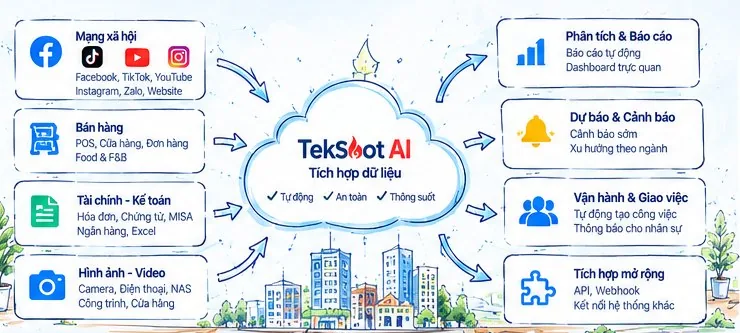
1. Supported data sources
Connect with popular platforms and devices.
Fanpage, posts, comments, messages
TikTok
Videos, comments, trends
YouTube
Channels, videos, comments
Posts, stories, ads
Zalo
OA, messages, customers
Website
Traffic, content, forms
POS
Invoices, products, revenue
Stores
Orders, menus, customers
MISA
Invoices, vouchers, accounting
Banks
Statements, transactions
Camera
Images, video, recognition
Files & documents
Excel, PDF, images, video, other documents
2. Data integration flow
From collection → processing → analysis → display.
1Data collection
- API
- Webhook
- File upload
- Devices
2Automatic sync
- Real time
- Scheduled
- Two-way sync
- New data detection
3Cleaning & normalisation
- Deduplication
- Format normalisation
- Data merging
- Validation
4Central storage
- CDE/NAS
- Cloud
- Permissions
- Change history
5AI analysis
- Content analysis
- Trend analysis
- Competitors & market
- Forecasting
6Display & alerts
- Dashboard
- PDF reports
- Notifications
- Automatic task assignment
3. Connection management and configuration
Businesses can configure connections themselves as needed, without coding.
| Data source | Status | Last sync | Configured by | Actions |
|---|---|---|---|---|
| Connected | 17/10/2026 09:15 | Marketing | Configure | |
| TikTok | Active | 17/10/2026 09:12 | Marketing | Configure |
| POS | Active | 17/10/2026 08:50 | Store | Configure |
| MISA | Syncing | 17/10/2026 08:30 | Accounting | Configure |
| Camera | Active | 17/10/2026 08:10 | Operations | Configure |
| Banks | Needs re-authentication | 16/10/2026 22:00 | Accounting | Configure |
4. Data sync and storage
Flexible storage in the cloud, on NAS or both.
Cloud
(Analytics data)
Devices, apps
Cameras, POS, social media
TekShot OS data warehouse
Normalised & centralised
Company NAS
Original data: images, video, files
5. Data security and control
Keep your data safe and under your control.
- SSL/TLS 256-bit encryptionData encrypted in transit
- Role-based permissionsGranular access by role
- Activity logTrack every action
- Cloud or on-premiseChoose where your data is stored
- Clear privacy policyPublished rules for data handling
- Personal data requestsExport or delete data on request
Ready to turn data into action?
Try TekShot OS free for 7 days with all 5 AI assistants. No credit card required, deployment support within 1–7 days.